Web Interface
The Raspi-Sump web interface is served over HTTPS by nginx and is accessible from any device on your local network.
https://<your-pi-ip>
Self-signed certificate
The TLS certificate is self-signed. Your browser will show a security warning on first access. Accept the exception to proceed — this is expected behaviour for a LAN appliance.
Tip
Raspi-Sump is intented as a local area network appliance. Exposing the web interface to the internet requires caution. Remote access should be restricted behind a VPN or a secure remote access service like Tailscale. At the very least you should ensure a strong password and segregate it to its own VLAN if you choose to expose it directly on the internet.
Navigation
The top navigation bar has three sections:
| Item | Description |
|---|---|
| Raspi-Sump | Home page — today's readings and stats |
| History | Historical readings with charts |
| Project | Links to documentation, source code, and issue tracker |
| ⚙ (gear icon) | Admin panel — login required |
Home Page
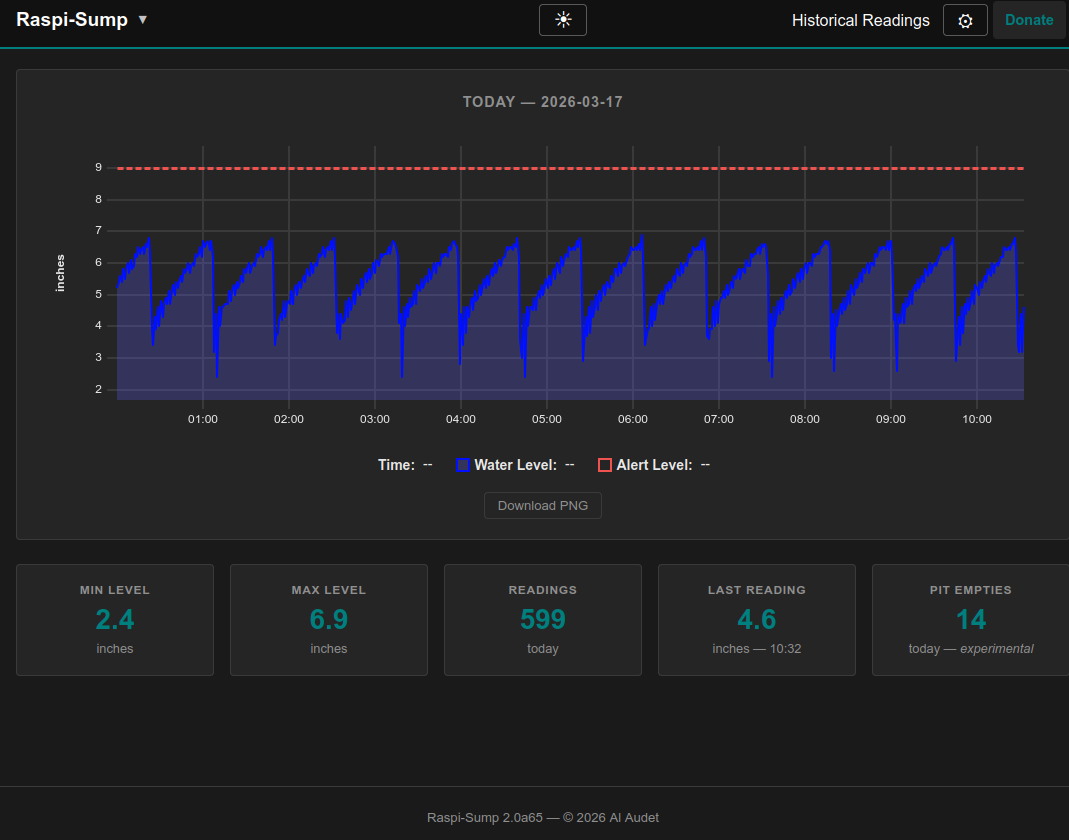
The home page displays today's water level activity:
- Stat cards — reading count, minimum, maximum, and last recorded depth
- Pit Empties — number of pump cycles detected today (shown when cycle detection is enabled)
- Chart — interactive water level chart for today
The chart is rendered client-side using uPlot. Hover over the chart to see individual readings. The chart updates on page reload.
History
The History page shows readings for a specific date or custom date/time range.
Single Day
Select a date from the date picker and click View. The page displays:
- Stat cards for the selected day
- Pit Empties for the selected day (when cycle detection is enabled)
- Interactive chart of all readings for that day
Custom Range
Select a start date and end date. Optionally add a start time and end time to narrow the range within those days. If no time is entered, the full day is used (midnight to 23:59).
Click View Range to display the chart.
Admin Panel
The admin panel is accessible via the ⚙ gear icon in the navigation bar. A login is required. The default password is set during the first-run setup wizard.
System Status
Displays the current status of the raspisump and rsumpweb services with
colour-coded badges:
- green — active and running
- red — inactive or failed
Each service has Start, Stop, and Restart buttons. Restarting
rsumpweb will briefly take the web interface offline and redirect you to a
countdown page before reconnecting automatically.
The page also shows the last 20 lines of the service logs from the system journal.
Configuration
A form editor for all settings in raspisump.conf. Changes are validated
before saving. After saving, restart the raspisump service for changes to
take effect (a restart button is provided on the page).
Backup / Export
Downloads a zip file containing:
- The SQLite database (
raspisump.db) - The current
raspisump.conf
Use this to back up your data before upgrades or when moving to a new Pi.
Import / Export CSV
Import: Upload one or more CSV files exported from Raspi-Sump 1.x. Duplicate entries are skipped automatically.
Export: Select a date range and download readings as a CSV file (single day) or a zip of CSV files (multiple days).
Support
- Get support for your installation when having problems.
Security
Manage credentials stored in credentials.conf:
- Change the admin password
- Update SMTP credentials
- Update Mastodon credentials
After saving changes, restart the rsumpweb service for credential changes
to take effect (a restart button is provided on the page).
Logout
Click the ⚙ gear icon and select Logout to end your admin session.
Dark Mode
A dark mode toggle is available in the navigation bar. Your preference is saved in the browser and applied on subsequent visits.
JSON API
External Clients
Thanks to Github user graysky2 for providing these endpoints. He provides a Home Assistant setup for Raspi-Sump which is separate from this project. The api can also be used by any other external client. If you are interested in this, see his github page. It has been added into the HACS ecosystem and is installable through the HACS tab of Home Assistant.
Beyond the pages above, Raspi-Sump exposes a small set of read-only JSON endpoints as of version 2.1.0. They're what power the charts on this site, but they're equally useful for pulling water level data into something of your own like a home automation setup, a monitoring dashboard, a phone widget, or a quick script. Nothing about them assumes a particular consumer.
No authentication required
These endpoints are unauthenticated, the same as the History charts they back. Treat them as part of the same LAN trust boundary as the rest of the read-only pages. The caution above about exposing the web interface to the internet applies here too.
You can query them with curl, a browser, or any HTTP client:
curl -sk https://<your-pi-ip>/api/status
The -k flag skips certificate verification.
GET /api/status
A compact snapshot of current state: the latest reading, today's stats, pump
cycle count, and whether the raspisump service is running, all in one
small payload. Built for polling on an interval, so a client doesn't need to
fetch a full day of readings just to check the latest value.
{
  "api_version": 1,
  "version": "2.1.0",
  "level": 41.2,
  "unit": "cm",
  "last_ts": "2026-07-26T09:20:00-04:00",
  "critical_level": 35.0,
  "pit_depth": 72.0,
  "alert_when": "high",
  "reading_interval": 60,
  "day": { "min": 38.1, "max": 52.0, "count": 540 },
  "cycles_today": 4,
  "service_active": true
}
api_version is incremented only when this payload's shape changes in a way
that would break a client — safe to build automation against.
Fields degrade to null rather than erroring when Raspi-Sump can't determine
them: cycles_today stays null unless cycle detection is enabled,
service_active is null if systemd is unavailable, and level, unit and
last_ts are null before the first reading is recorded (unit falls back
to the value configured in raspisump.conf in that case).
GET /api/readings
All readings for one calendar day, in the array-of-arrays form the chart library (uPlot) consumes.
| Parameter | Description |
|---|---|
date |
YYYY-MM-DD, defaults to today |
curl -sk "https://<your-pi-ip>/api/readings?date=2026-07-26"
{
  "date": "2026-07-26",
  "unit": "cm",
  "critical_level": 35.0,
  "data": [[1769433600, 1769433660], [41.2, 41.4]]
}
The first inner array is Unix timestamps in local time, the second is the matching water levels.
GET /api/readings/range
The same shape as above, across an arbitrary start/end range instead of a single day.
| Parameter | Required | Description |
|---|---|---|
start |
yes | YYYY-MM-DDTHH:MM |
end |
yes | YYYY-MM-DDTHH:MM |
curl -sk "https://<your-pi-ip>/api/readings/range?start=2026-07-26T00:00&end=2026-07-26T12:00"
Omitting either parameter returns a 400 with an error message rather than
guessing at a default range.